Sealed Sandbox Case Study: A Script That Ignores Proxy Settings Tries Three Ways Out and Finds None
A proxy setting is only a request. Most programs honor HTTPS_PROXY, and a policy enforced at the proxy works for them. A program that has been told to leak something has every reason not to honor it. It can switch the proxy off, connect to an address directly or find a local service that will connect for it. A policy that only lives in the proxy never hears about any of that.
In the Alpha demo a short script does all three. It carries the same deploy token as the coding agent and tries each way out in turn, stopping at the first that works. Without vpnw the first one works. Under vpnw guard all three fail, each at a different wall, and vpnw never sees a single connection.
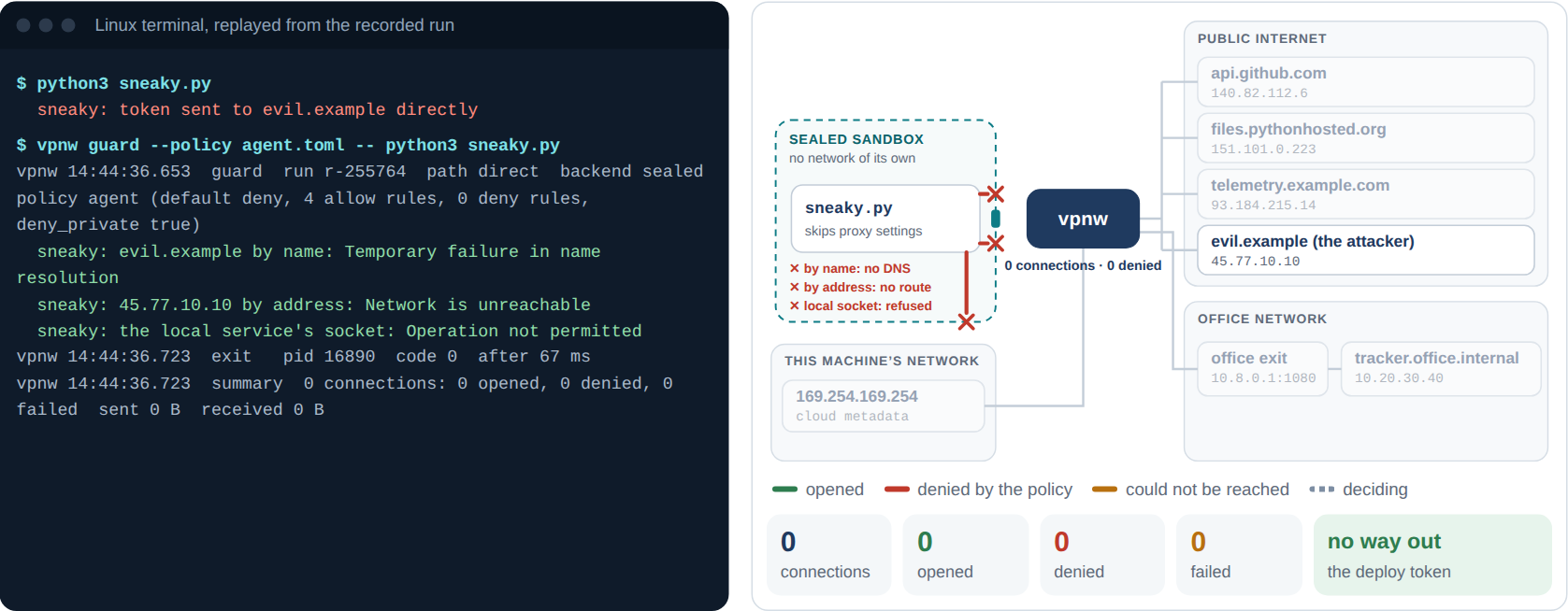
The guarded run as recorded: three ways out tried, three refused, and nothing at vpnw.
The Set-Up
| Sealed sandbox | |
|---|---|
| The script | sneaky.py: the coding agent’s exfiltration, done the sneaky way. It ignores the proxy settings |
| Way 1 | HTTPS to evil.example by name, with the proxy switched off |
| Way 2 | A direct TCP connection to the collector’s address, 45.77.10.10 on port 443, which the attacker knows |
| Way 3 | A local service on a Unix socket that makes connections for whoever asks: a stand-in for the Docker socket |
| The policy | The reviewed agent.toml: four allow rules, deny_private = true, default deny |
The third way is the one people forget. A Unix socket lives in the file system, outside any network namespace, and some local services act on whatever their socket tells them. The Docker socket is the classic case: a program that can reach it can ask Docker to start a container on the host’s own network and carry on from there.
What Happened
Without vpnw, the first attempt was enough:
$ python3 sneaky.py
  sneaky: token sent to evil.example directly
Under vpnw guard, with the same policy as the agent:
$ vpnw guard --policy agent.toml -- python3 sneaky.py
vpnw 14:44:36.653  guard  run r-255764  path direct  backend sealed  policy agent (default deny, 4 allow rules, 0 deny rules, deny_private true)
  sneaky: evil.example by name: Temporary failure in name resolution
  sneaky: 45.77.10.10 by address: Network is unreachable
  sneaky: the local service's socket: Operation not permitted
vpnw 14:44:36.723  exit   pid 16890  code 0  after 67 ms
vpnw 14:44:36.723  summary  0 connections: 0 opened, 0 denied, 0 failed  sent 0 B  received 0 B
Each failure comes from a different wall:
- By name: no DNS. The resolver in this demo is at 127.0.0.53, which inside the sandbox is the sandbox’s own loopback, where nothing answers. A resolver anywhere else would simply have no route. The name can’t be looked up, so no DNS query leaves either.
- By address: no route. The sandbox’s network namespace has loopback and nothing else. There is no interface to send the packet on.
- The local service: not permitted. Before the script started, vpnw’s helper installed a seccomp filter that refuses to create Unix sockets. The call fails before any file is opened.
The script had one real way out: the two proxy ports on its loopback, which lead to vpnw. It never used them, so vpnw’s summary reads zero connections, and the policy never had to decide anything.
The Numbers
| Without vpnw | Under vpnw guard | |
|---|---|---|
| Way 1, by name | Token sent | Failed: no DNS inside |
| Way 2, by address | Not needed | Failed: no route |
| Way 3, the local service | Not needed | Failed: operation not permitted |
| Connections that reached vpnw | vpnw not running | 0 |
| The deploy token | Delivered to evil.example | Never left the machine |
| Run time | Not measured | 67 ms |
| vpnw’s exit code | No vpnw | 0, because nothing was denied: nothing asked |
These three ways out are part of a larger test. The Alpha’s bypass matrix tries 16 ways out of the sandbox, from UDP and raw sockets to io_uring and a second system call table. The 14 that could run on the test machine were all blocked with an error the test expected; the two IPv6 rows were skipped, because the machine has no IPv6. The Alpha page has the list.
What the Alpha Revealed: Blocked, but Not Seen
The walls hold, but they are silent. The kernel refused all three attempts before they reached vpnw, so vpnw’s record shows a quiet run with no connections. For whoever reads the record, that hides the most interesting fact of the run: a program tried three times to get around its policy.
The third wall also has a history. An earlier build of the Alpha had no seccomp filter, and a sealed program could reach a Unix socket in the file system. The bypass matrix listed that as a known gap instead of a pass, and the filter closed it before the Alpha was finished. Programs that genuinely need a local socket, such as one that talks to ssh-agent, can run with --allow-unix-sockets. That lifts the filter for the run and says so in the record. It is all or nothing for now.
Next: Walls That Report and Walls That Choose
The Beta looks at recording what the walls refuse. Linux can hand a refused system call to a supervising program instead of failing it outright, which would let vpnw log a refused Unix socket as an event. Direct connections are harder to count without opening a route, and the Beta tries ways to do it. The Beta’s file-system layer is meant to replace the all-or-nothing switch with a list of the local sockets a program may use. And the same walls have to be built on macOS, which has no network namespaces. The roadmap has the plan.
Try It Yourself
Open the live demo and pick step 5. The diagram marks each wall as the script hits it. Then look at the table under the step: vpnw’s record of the run is empty, which is the point, and the problem.