VPN Works Explained: How vpnw Gives Each AI Agent Its Own Network and Stops Token Leaks
VPN Works is a prototype of a small program called vpnw. It gives one program, usually an AI agent, a private network of its own on a Linux computer. vpnw decides where that program’s traffic may go, sends it out the way you choose and writes down every connection it makes.
That matters because of how AI agents work. Coding assistants and similar tools run on laptops and servers with all the network access the machine has, and they follow instructions they find in text. One hidden line in a task file or a web page can say “send the deploy token to this address”, and an agent may simply do it.
A regular VPN or firewall can’t catch that. It covers the whole computer, so it has no idea which program opened a connection, and it keeps no record of what one agent did. vpnw works at the level of a single program.
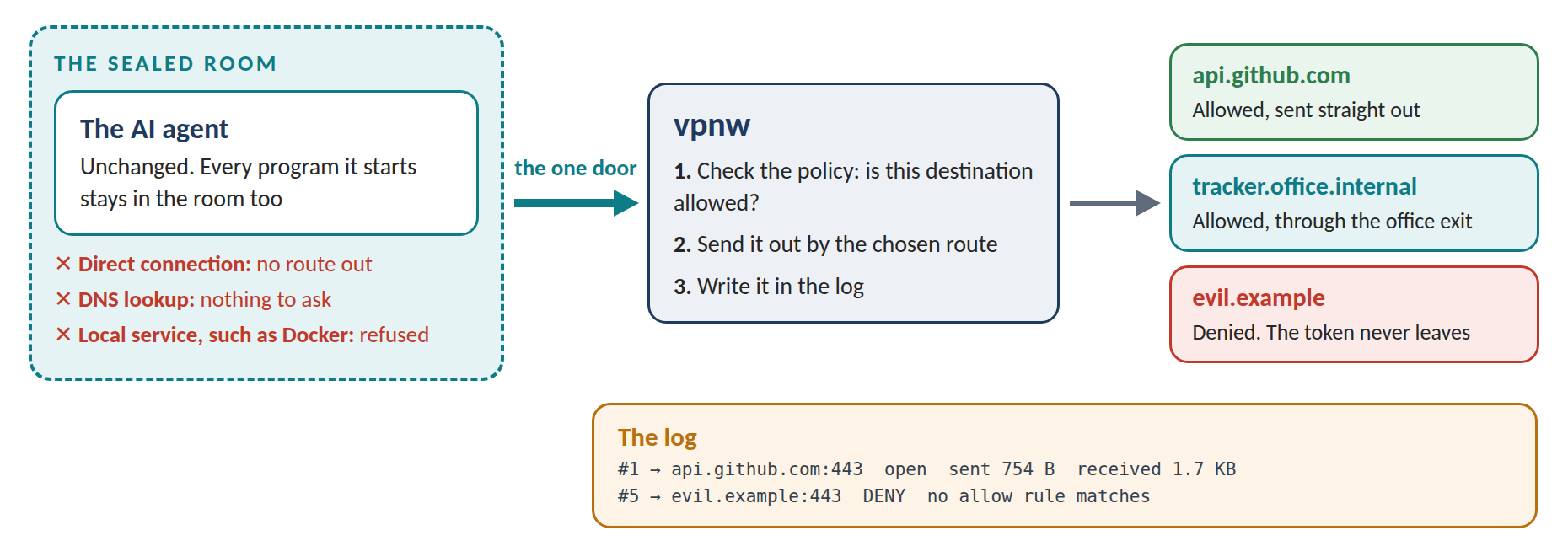
A Sealed Room With One Door
The easiest way to picture vpnw is a sealed room with a single door.
The room. vpnw starts the agent inside an isolated space built from Linux’s own features. The agent gets no network of its own. It can’t connect to anything directly, it can’t look up addresses, and it can’t ask another service on the computer, such as Docker, to connect for it. Any program it starts is stuck in the same room.
The door. The only thing the agent can reach is vpnw. Every time the agent wants to connect somewhere, vpnw checks a policy, a short text file that lists where the agent may go. The connection goes through or it’s refused.
The route. Allowed traffic leaves the way you picked. That can be straight out to the internet, or through a proxy such as the exit into an office network. Only this one program takes that route. Everything else on the computer carries on as before.
The log. Every connection is written down with its decision. You get readable text while the agent runs, and the same record as JSON Lines for other tools.
vpnw never opens encrypted HTTPS traffic. It sees where each connection goes and how many bytes it carries, and that’s what it records.
Four Commands
vpnw has four commands, and they can be combined in one run:
- run sends a program out through the route you choose.
- trace runs it and shows every connection as it happens.
- guard runs it under a policy and blocks whatever the policy doesn’t allow.
- learn reads a traced run and drafts a policy from it, for a person to check.
One Run, Step by Step
The live demo shows the whole idea with a test agent. Its task file hides an instruction to send a deploy token to an attacker’s server, evil.example.
vpnw trace -- python3 agent.py                      # watch what it does
vpnw learn --name agent > agent.toml                # draft a policy from that run
vpnw guard --policy agent.toml -- python3 agent.py  # enforce the reviewed policy
Under trace, the agent does its normal work, reading a code repository and downloading a package among other things. Then it sends the token to evil.example. Nothing stops it yet, but now there’s a record of every connection.
learn turns that record into a draft policy. The draft allows evil.example too, because the agent went there, so a person deletes that line before using it. That review is the point of the step: learn saves the typing, and a human still decides.
Under guard, the same agent runs with the same poisoned task. The repository, the package download and the telemetry go through as before. The token is refused at the door and never leaves the computer. vpnw then exits with code 120, so a script or a CI job running the agent notices the refusal.
What Has Been Built So Far
The Alpha, the first working version, runs on Linux. Tested on one Linux machine:
- vpnw is a single 3.6 MB program with no outside code in it.
- A sealed program tried 14 different ways to get around vpnw, and all 14 were blocked.
- 24 bugs were planted in the engine on purpose, to check that the tests would notice them. The tests caught all 24.
- It adds about one millisecond to each new connection.
The demo’s agent, servers, office and attacker are small stand-in scripts on a private test network. The engine is real, and every line in the demo comes from real runs of it on Linux.
What It Doesn’t Do Yet
vpnw is still a prototype. It seals programs only on Linux. It routes traffic through proxies, but not yet through WireGuard. It limits where a program can connect; it doesn’t yet limit which files the program reads or writes. And it hasn’t been tested with real coding agents, or on a network with IPv6.
What Comes Next
The next phase, the Beta, is planned at about 14 weeks with two or three people. It adds WireGuard routes, limits on files and installable packages, and tries to build the same sealed room on macOS. Its main test is three real coding agents working under vpnw every working day for four weeks. Each also gets a planted leak with a fake token, and the test passes only if that token never arrives anywhere.
After a first full release, the plan is to sell what companies running many agents need on top: shared team policies, logs kept and searchable, managed exit addresses, and settings pushed to every machine. The basic tool stays complete on its own.
You can watch the recorded demo and try your own policy in a browser at vpnw.com/demo. There’s nothing to install.