Lab
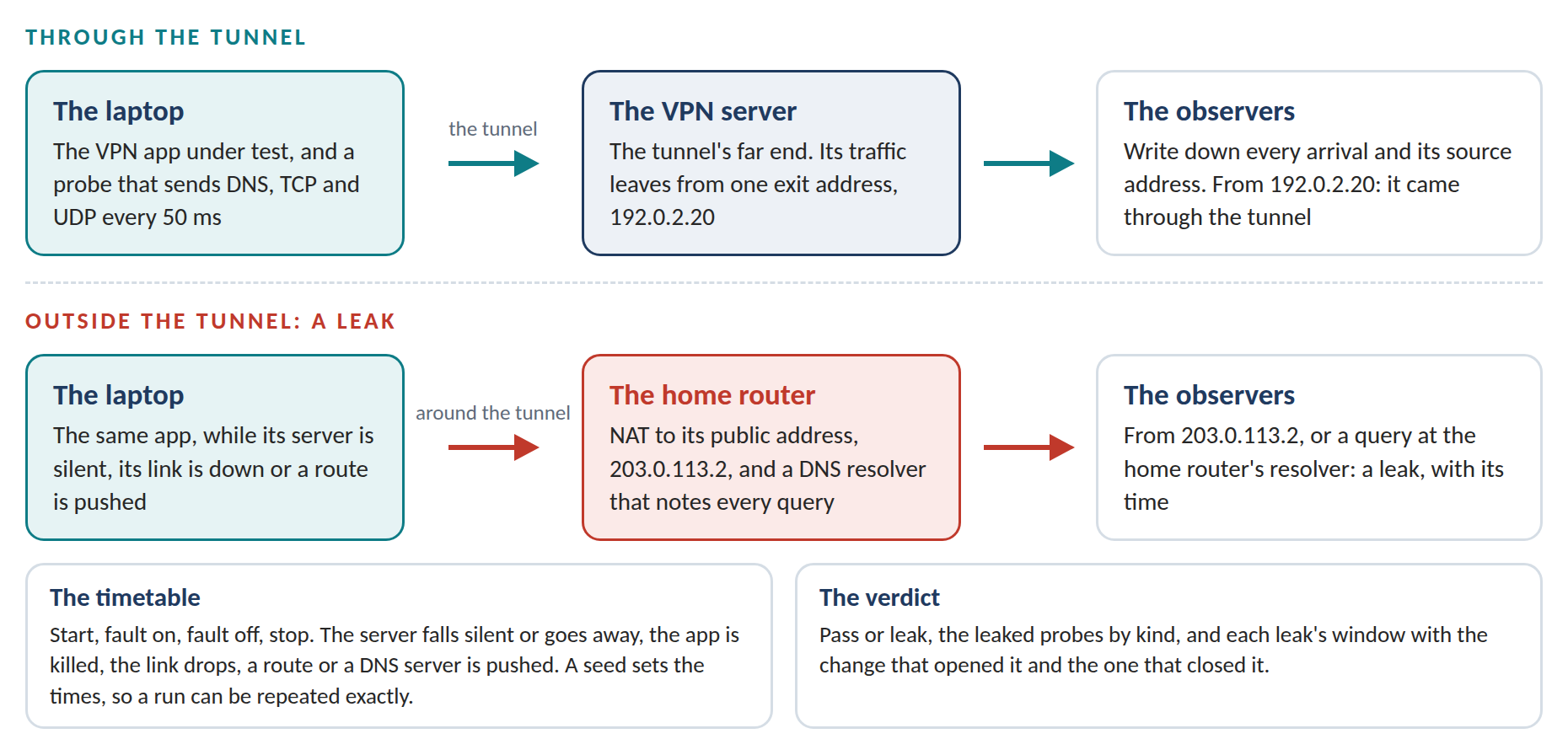
Lab is the third engine of VPN Works, a test bench for VPN apps. It runs a VPN app in a private test network on Linux, keeps a probe sending traffic through it, and breaks things on a timetable: the VPN server falls silent or goes away, the app is killed, the link drops, the local network pushes a route or hands out a new DNS server. Observers on the far side write down every arrival and the address it came from. When something leaves outside the tunnel, Lab knows which probe it was and when.
VPN Works keeps network access narrow and on the record. The Agent gives each AI agent a network of its own. Scope gives each person on a company VPN only the systems they use. Lab checks that VPN apps keep traffic inside the tunnel when things go wrong. Ledger makes every record tamper-evident. Exit checks the policy again at the far end.
Most leak tests are web pages that check one moment from inside a browser. Leaks tend to happen at moments a page can’t see, such as a reconnect, a crash or a change of network. A hostile local network can also push a route that pulls traffic out of the tunnel, the flaw published as TunnelVision (CVE-2024-3661) in 2024. Lab watches from the network side and sets the time of every fault itself, so a leak can be repeated and a fix checked again.
Lab 0.1.0 is an Alpha: a working engine, tested on one Linux machine. The apps it has tested are four stand-in VPN clients built for the bench, one correct and three with a planted fault each, and the VPN Works Agent. No third-party VPN app has run on it yet.
Try It
The demo below replays two real runs on the bench. The VPN server falls silent for five seconds, and two stand-in clients go through the same reconnect: the correct one, and one that points its DNS at the home router while it reconnects. The page runs Lab’s own verdict code, compiled to WebAssembly, on the recorded runs, and nothing you do in it leaves your browser.
The demo has more room on its own: open it full screen.
What the Demo Shows
| Step | What happens |
|---|---|
| The bench | Four private networks: the laptop with the app and the probe, the home router, the internet with its observers, and the VPN server |
| The fault | The VPN server falls silent from 1.59 s to 6.59 s. Both clients notice about a second later and start to reconnect |
| The correct client | Its tunnel is down from 2.58 s to 6.66 s, and its kill switch holds back the 246 probes sent in that time. 60 more are lost in the silent tunnel before the client notices. None leaves outside, and probes come through the tunnel again 105 ms after the server answers |
| The leaky client | 81 DNS queries reach the home router’s resolver between 2.60 s and 6.60 s, the first 27 ms after the client points its DNS at 192.168.1.1. Its kill switch holds back its TCP and UDP probes |
| One probe at a time | Both runs around the reconnect. Pick any probe to see where it arrived and how Lab judged it |
| Other faults | A client with no kill switch, killed for 2 s, and a client that follows pushed routes, both decided in the page, and the matrix of every app and fault |
The DNS leak case study walks through it step by step.
How It Works
- A world for each run. Four network namespaces joined by virtual links, built in about a tenth of a second and thrown away after the run. The addresses come from the ranges set aside for documentation and from private ranges.
- A probe. Every 50 ms it sends a DNS query for a name nobody asked for before, a short TCP connection and a UDP datagram, each tagged with the run and a sequence number.
- Judged by address. An arrival from the VPN’s exit address came through the tunnel. One from the home network’s public address, or a query at the home router’s resolver, leaked. Lab needs nothing from the app to tell them apart.
- A timetable. Each scenario is a list of timed steps: start, fault on, fault off, stop. A seed moves the fault by up to 400 ms, and the same seed gives the same timetable.
- Seven scenarios. Steady traffic, the server silent, the server gone, the app killed, the link dropped, a route pushed and the DNS server changed.
- A verdict. Pass or leak, the leaked probes by kind, and each leak’s window with the change that opened it and the one that closed it. The verdict code makes no system calls, so the same code runs on the command line and in the browser.
What Was Measured
| Figure | What it means |
|---|---|
| 210 of 210 | Runs that gave the verdict the design expects: six apps through seven scenarios, five times each. Each faulty client leaked in every run of the scenarios that expose its fault and passed the others, and the correct client passed every run |
| 22 ms | The median time from the change that opened a leak to the first leaked probe Lab saw, over 50 leak windows; at most 52 ms. The probe sends every 50 ms |
| 29 of 29 | Deliberately planted bugs caught by the tests |
| 3.9 s to 8.1 s | One scenario run of the correct client, from the command to the verdict, with the test world built and torn down |
| 93.7% | Share of statements the tests run |
The Agent took part as itself. Sealed, it passed every run. With proxy settings only, programs that ignore the settings go direct, as the Agent’s documents say, and Lab reported every one of those runs as a leak.
All figures come from one machine with two CPUs, Linux 6.18 on x86-64. Lab is written in Go with the standard library only, and its Linux program is 3.3 MB.
Limits
- Stand-ins. The four clients and the VPN server were built for the bench. They behave like VPN software in their routing, firewall, DNS and timing, and they encrypt nothing. Real apps will fail in ways the stand-ins don’t model.
- Real apps. No third-party VPN app has run on the bench yet. Results about named vendors’ apps need legal review before anyone publishes them.
- IPv4 only. The test machine has no IPv6, and the IPv6 scenarios were cut for time.
- Short leaks. A leak shorter than the probe’s 50 ms can pass unseen.
- Network events are simulated. No DHCP server or client runs: the bench makes each change itself. Sleep, roaming and captive portals aren’t simulated yet.
The Code
VPN Works is open source under the Apache License 2.0. Copyright VPNW.com 2026. The code is at https://github.com/VPNWorks/vpnw. The Lab Alpha report has every test and figure, and the commands that reproduce them.
What Comes Next
A harness that installs and drives real VPN apps: Linux command-line clients first, then desktop and mobile apps in virtual machines. After that come IPv6, a real DHCP server and client, sleep and roaming, and reports across many runs. The roadmap has the plan for every engine. Teams who build or run VPN apps and would like a scenario tested are welcome to write.