DNS Leak Case Study: A Stand-In VPN Client Sends 81 Queries to the Home Router While It Reconnects
A VPN app is easy to test while everything works. Open a leak-test page, see the VPN’s address, done. The trouble comes at moments nobody watches: the server stops answering for a few seconds, the app reconnects, and for that short time it makes its own choices about where traffic goes.
Take DNS. An app that can’t reach its server may point name lookups at the local network so that names keep working. Then every name the laptop looks up while the tunnel is down goes to the home router, or the café’s, in plain text, whatever the VPN promised.
Lab, the third VPN Works engine, tests for exactly that. It runs the app in a private test network, breaks the connection at a set time, and watches from the far side. In its demo, the VPN server falls silent for five seconds, from 1.59 s to 6.59 s into the run, and two stand-in clients go through the same outage. One of them leaks.
The Leaky Client
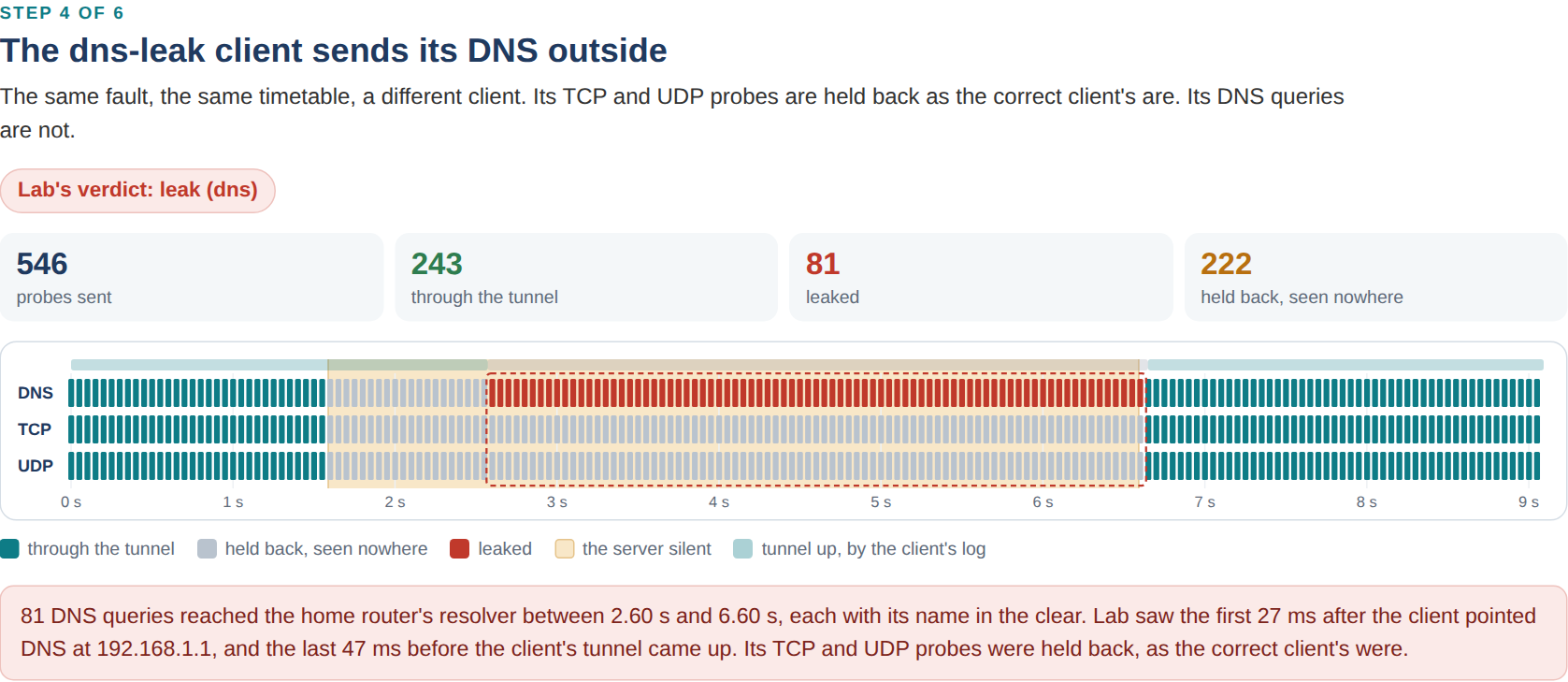
About a second after the server fell silent, the client gave up on it and started to reconnect. While it did, it pointed its DNS at the home router, 192.168.1.1. The first query reached the router’s resolver 27 ms later. In all, 81 DNS queries arrived there between 2.60 s and 6.60 s, every name the probe looked up while the client reconnected. The last came 47 ms before the client was back up.
Its kill switch held everything else. Not one TCP connection or UDP datagram left outside the tunnel: 101 of each went nowhere, 20 of them lost in the silent tunnel during the second before the client noticed.
The Correct Client
The correct client went through the same outage. By its own log, its tunnel was down from 2.58 s to 6.66 s, and its kill switch held back the 246 probes sent in that time, DNS included. 60 more were lost in the silent tunnel before it noticed. None left outside. Its DNS stays pointed into the tunnel, and its kill switch drops everything on the physical link except its own tunnel packets, connected or not. Probes came through the tunnel again 105 ms after the server answered.
Losing traffic during an outage is the right result here. The user waits a few seconds, and nothing goes out in the clear.
Watched From the Network Side
Lab doesn’t ask the app what it did. Observers on the far side write down every arrival with its source address and time. A probe that arrives from the VPN’s exit address came through the tunnel. One that arrives from the home network’s public address, or a query that reaches the home router’s resolver, leaked. The probe sends a DNS query, a TCP connection and a UDP datagram every 50 ms, each tagged with a sequence number, so Lab can say which probe leaked and when.
From that record, Lab’s verdict names each leak’s window and the change that opened it. For the leaky client, the leak opened 27 ms after the change “client dns 192.168.1.1 (while reconnecting)” and closed 47 ms before “client up”.
Same Seed, Same Verdict
A leak you can’t repeat is hard to fix. Lab sets the time of every fault from a seed, so a run can be made again with the same timetable. In the measurements, each of six apps went through each of the seven scenarios five times with the same seed. All 210 runs gave the verdict the design expects, no verdict changed from one run of a scenario to the next, and the number of leaked probes varied by at most four.
The same client leaks at other moments too: when the home network hands out a new DNS server, when the VPN server goes away for good, when the link drops. A client with no kill switch leaks TCP and UDP whenever its tunnel is down, and one that follows routes pushed by the local network leaks to the pushed range, the flaw published as TunnelVision in 2024. The Lab page has the matrix of every app and fault.
Is Any of It Real?
The bench is real: Linux network namespaces, routing tables, nftables firewalls and real processes, on one machine. The clients and the VPN server are stand-ins built for the bench. They behave like VPN software in their routing, firewall, DNS and timing, and they encrypt nothing. No third-party VPN app has run on the bench yet, and results about named vendors need legal review before anyone publishes them.
The demo replays the two recorded runs, and the page runs Lab’s own verdict code, compiled for the browser, on them. It gives the same numbers as the command line.
What It Doesn’t Catch Yet
A leak shorter than the probe’s 50 ms can slip between two probes. A leak to somewhere the probe never sends, like a DNS server hardcoded in another app, isn’t seen either. And the test machine has no IPv6, so the obvious next scenario, an app that tunnels IPv4 and leaks IPv6, hasn’t run.
The demo runs in the browser on the Lab page, with nothing to install. The code is at github.com/VPNWorks/vpnw.